[Online] Exchange: Applicable for orders that comply with return & exchange policy
[Online] Returns: Prior to authorizing the return/refund process, below are the steps for conducting an investigation. Reference: Returns checklist
| Returns Eligibility |
Remarks |
| Return Window |
Return request form to be submitted within 14 calendar days from the date of the last delivered parcel.
Shopify
1. In the order page, scroll down to Timeline.
2. You will find the delivered date and time as below: 
|
| Refundable/Non-refundable Products |
Refundable Product
1. Return & exchange of items including sale/discounted items are allowed except for non-returnable products.
2.Products must be:
- Unused/ unwashed/ unworn
- In its original packaging with original tags intact
- Shoes must be returned in its original box
3. Packed & sealed in the same parcel bag/box or polymer bag
|
Non - Refundable Product
- Beauty Products (Eg: Hand Cream & Sets, Sanitizers, and etc)
- e-Gift cards
- Hosiery
- Lingerie Sets (Eg: Women's Shapewear and Body Shaper)
- Underpants
- Socks
- Swimwear *only returnable with the original hygiene sticker
*As the list is non-exhaustive and may vary from time to time, you may always refer to this page to determine the item's return eligibility.
|
|
Reason of Return
|
It is mandatory for the customer to submit the description and a clear image.
CS to ensure that we have received the necessary documents (please refer below) before authorizing the return/refund.
Shopify
1. In the Order page, click 'Returns' under order view.
2. Return reason is available in Return requested section 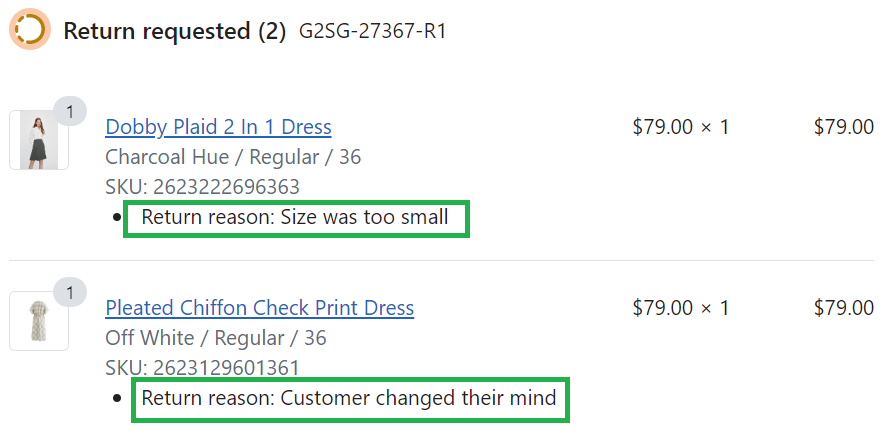
3. Based from the return reason below, agent may/may not need to check with customer for further info.
|
| Supporting Document Required |
Supporting Document NOT Required |
|
| Damaged parcel |
• Detailed description of the damage
• Picture of the damaged parcel and content
• Picture of the item with product tags (barcode)
|
| Defective |
• Detailed description of the defect
• Picture of the item with the product tags visible (barcode)
• Picture of the flaw/defective area
|
| Different than described |
• Detailed description of the product received against the product listed online
• Picture of the item received with the product tags (barcode)
• Picture of the inner label (the brand and the size tag)
|
| Poor Quality |
• Detailed description of the item received
• Picture of the item with the product tags visible (barcode)
• Picture of the flaw/defective area
|
| Missing item |
- DOJO: request for photo of the shipping label
- Others: escalate to TL/Ops
|
| Wrong item received & Wrong size received |
• Detailed description of the product received against the product listed in website
• Picture of the product received with the product tags visible (barcode)
• Picture of the inner label (the brand and size tag)
|
|
- Doesn't fit me
- Doesn't suit me
- Incomplete item
- Item arrived late
- Lost parcel
- Order cancellation
- Ordered extra quantity
- Ordered more than one size
- Wrong item ordered
- Wrong label
- Wrong size ordered
- Others
*Other reasons provided by the customer apart from the list above. You may check with the TL for the next course of action.
|
| Return Form |
G2000 Account
Customer would be able to view their past orders once they are logged in
Manual RMA (to be created by CS
- From order page, click Return.
- Enter quantity of the item that customer wants to return
- Select return reason
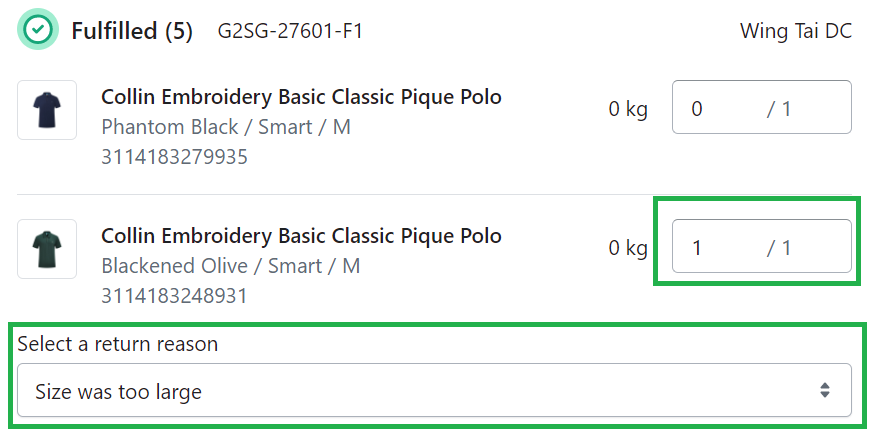
- Click Create Return. Customer will receive return request notification.
- Refer to How to work on return request
|
|
Return Method
|
Drop Off at POPStation
Drop Off at Store
*If customer request for a pickup option, escalate to TL for exceptional handling (subject to approval).
|
|

Comments
0 comments
Article is closed for comments.